
To delete Viber account permanently, you need to use the official Deactivate Account option inside the Viber mobile app. Viber does not usually label this as “delete account,” but deactivation is the account-removal process: it disconnects your phone number from Viber, removes your account from linked devices, deletes Viber data from your device, and removes your profile from Viber’s active service.
Before you do it, take a few minutes to back up anything important. Once you deactivate Viber, your chat history, call history, groups, and synced desktop access are not something you should expect to recover as they were. If you only want to stop notifications or take a short break, uninstalling the app may be a safer choice than full Viber account deletion.
Before You Delete or Deactivate Viber
The most important thing to understand is that Viber account deletion is tied to your phone number. If you deactivate the account, that number is no longer registered with Viber. If you later sign up again with the same number, you may be treated as a new or reactivated user, but your old chat history is not automatically restored unless you made and kept a usable backup.
Back up or save these items first
- Chat history: Create a Viber backup if you may want to restore chats after reinstalling. Backups are usually stored through Google Drive on Android or iCloud on iPhone.
- Photos and videos: Save important media to your phone gallery, cloud storage, or computer. Do not assume it will remain accessible after account deactivation.
- Important files: Download documents, voice notes, or shared attachments that you may need later.
- Group ownership: If you manage a group or community, assign another admin before leaving or deactivating.
- Viber Out details: Check any paid services, subscriptions, or credit balance before deleting the account.
- Contacts: Viber does not delete your phone contacts, but you may want to note down usernames or numbers you only contacted through Viber.
If your goal is only to fix app problems, consider updating or reinstalling Viber instead of deleting your account. You can get the app again from the Viber Download page and sign in with your phone number.
How to Delete a Viber Account Permanently on Android or iPhone
The steps are nearly the same on Android and iPhone. Make sure you are using the phone that has your active Viber account.
- Open the Viber app on your phone.
- Tap More. On some versions, this appears as a menu or three-dot icon.
- Go to Settings.
- Tap Account.
- Select Deactivate Account.
- Enter your phone number if Viber asks for confirmation.
- Review the warning carefully, then confirm deactivation.
After confirmation, Viber will deactivate the account linked to that phone number. Your connected desktop or tablet sessions should also stop working because the mobile account is the primary account.
Deactivate Viber vs Uninstall Viber: What Is the Difference?
Many people uninstall Viber thinking they have deleted the account. These are not the same. Uninstalling removes the app from your phone, while deactivation removes your Viber account registration.
| Action | What it does | Best for |
|---|---|---|
| Deactivate Viber | Removes your account from Viber, disconnects your number, deletes local Viber data, and signs out linked devices. | Users who want permanent Viber account deletion. |
| Uninstall Viber | Removes the app from your phone but does not necessarily delete your Viber account. | Users taking a break or freeing phone storage. |
| Log out or stop using Viber | Limits use but may leave your account active and reachable. | Users who only want fewer notifications. |
| Delete individual chats | Removes selected conversations from your device only. | Users who want privacy without deleting the whole account. |
What Data Is Removed When You Deactivate Viber?
When you deactivate Viber, the account linked to your phone number is removed from active use. The practical result is that your Viber identity, message history on your device, call history, and linked-device access are cleared or disabled.
Usually removed or disabled
- Your Viber account registration for that phone number.
- Your Viber profile from active Viber use.
- Your chat history and call history on the device.
- Your access from Viber Desktop and other linked devices.
- Your membership visibility in groups, depending on group type and how Viber records the exit.
Not always removed everywhere
- Messages you already sent: Other people may still see messages you sent in their own chat history.
- Media saved by others: Photos, videos, and files downloaded by recipients are outside your control.
- Phone contacts: Deactivating Viber does not delete contacts stored in your phone address book.
- Cloud backups: Viber deactivation may not automatically delete backups stored in Google Drive or iCloud. You may need to remove those manually if you want a cleaner deletion.
This is why it is better to review sensitive conversations before deletion. If Viber still allows you to delete a specific message for everyone, do that before deactivating. Once the account is deactivated, you lose normal access to those chats.
What Happens to Groups and Chats After Viber Account Deletion?
Your own Viber app will no longer show your previous chats after deactivation. For other people, the result is different: they may still have their copy of the conversation, including messages you sent before you deleted the account.
In one-to-one chats
- Your chat disappears from your device after deactivation.
- The other person may still have the old conversation on their device.
- Your future messages will not be delivered because the account is no longer active.
In groups and communities
- You may be removed from groups or shown as having left.
- Messages you already posted may remain visible to other members.
- If you are the only admin, you should add another admin before deactivation to avoid management problems.
- Other members are not removed just because you deactivate your account.
How to Delete Viber Backups from Google Drive or iCloud
If your reason for deleting Viber is privacy, do not forget about cloud backups. Deactivating Viber mainly affects the app account and local app data. Backups stored outside the app may still exist until you remove them from your cloud account.
On Android
- Open Google Drive or your Google account storage settings.
- Look for app backups or Viber backup data.
- Delete the Viber backup if you no longer want it stored.
On iPhone
- Open Settings on your iPhone.
- Tap your Apple ID, then go to iCloud.
- Open iCloud storage or backups.
- Find Viber-related backup data and remove it if needed.
The exact labels can change depending on your phone and operating system version, but the idea is the same: check the cloud account connected to your Viber backups, not just the Viber app.
Can You Recover a Deleted Viber Account?
You can usually register again with the same phone number, but that does not mean your old account data comes back automatically. Recovery depends on what you saved before deactivation.
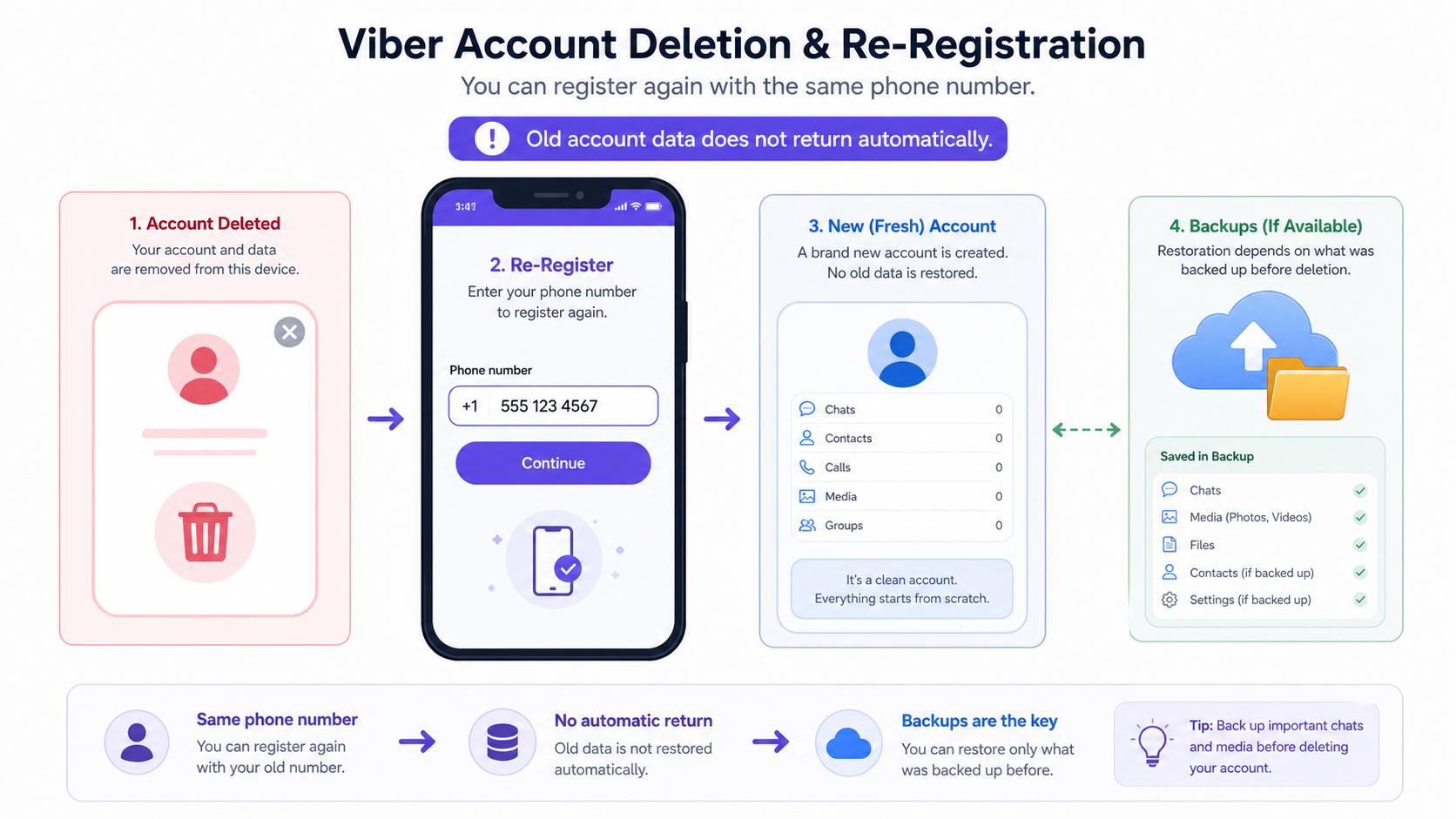
- If you made a valid chat backup before deletion, you may be able to restore supported chat history during setup.
- If you did not back up chats, old conversations are likely gone from your device.
- If you had paid items, stickers, or Viber Out credit, check Viber’s current account and payment rules before deactivation because restoration can depend on platform, account status, and service terms.
If you are unsure, read the official help inside the app before confirming. For related usage guides, the Viber Blog can also be useful when comparing uninstalling, reinstalling, and account settings.
Final Checklist Before You Deactivate Viber
- Back up chats if you may want them later.
- Save important photos, videos, voice messages, and files.
- Transfer group or community admin roles.
- Check Viber Out credit, subscriptions, and paid services.
- Delete sensitive messages where possible before deactivation.
- Remove cloud backups manually if you want to reduce stored copies.
- Confirm that you want deletion, not just a temporary break.
FAQ
How do I permanently delete my Viber account?
Open Viber, go to More, then Settings, Account, and choose Deactivate Account. Confirm with your phone number if asked. This is Viber’s account deletion process.
Does deactivating Viber delete messages for everyone?
No. Deactivation deletes your access and local chat history, but messages you already sent may remain in other people’s chats. Save or remove sensitive content before you deactivate if Viber still gives you that option.
Will deleting Viber remove me from groups?
Yes, deactivating your Viber account generally removes you from active group participation. However, old messages you posted in groups may still remain visible to other members.
Can I delete Viber without losing my chat history?
If you only uninstall the app, you may be able to keep or restore data depending on your backup. If you deactivate the account, you should expect your local chat history to be removed unless you made a usable backup beforehand.
Do I need to delete Viber backups separately?
Yes, if privacy is your goal. Viber deactivation may not automatically remove backups stored in Google Drive or iCloud, so check your cloud storage and delete old Viber backups manually if needed.