
You can recover Viber messages only if you created a Viber backup before the chats were deleted, or if media files were saved separately on your phone or cloud storage. If there is no prior backup, deleted Viber chats normally cannot be restored from Viber’s servers because Viber does not keep a readable copy of your private chat history for later recovery.
This is the most important point to understand before trying every recovery tool you see online. Viber restore chat history is useful, but it has clear limits. It can bring back backed-up messages after reinstalling or activating the app, but it cannot magically rebuild chats that were never backed up.
Before You Start: What Viber Can and Cannot Recover
The Viber app is designed around private messaging, which means recovery depends heavily on backups stored through your device account, such as Google Drive on Android or iCloud on iPhone. Viber itself is not a permanent archive of every deleted message.
| Situation | Can you recover it? | What to try |
|---|---|---|
| You deleted chats but had a recent Viber backup | Usually yes | Reinstall or reactivate Viber and restore from backup |
| You never enabled Viber backup | Usually no | Check saved media, notifications, or other devices, but full chat recovery is unlikely |
| You changed from Android to iPhone or iPhone to Android | Limited or no standard restore | Viber backups are generally platform-specific |
| You only need photos or videos | Sometimes | Check your gallery, Files app, Google Photos, iCloud Photos, or device storage |
| You deleted the whole Viber account | Usually no | Account deletion removes associated Viber data and is not the same as reinstalling |
How to Recover Deleted Viber Chats from Backup
If you previously enabled backups, this is the safest and most realistic recovery method. The exact screens may vary slightly by device and app version, but the overall process is similar.
On Android
- Make sure you are signed in to the same Google account used for the original Viber backup.
- Install or reinstall Viber from a trusted source. If needed, you can download Viber from the official download page.
- Open Viber and activate it with the same phone number used when the backup was created.
- When Viber detects a backup, choose the restore option.
- Wait for the restore to finish before opening multiple chats or closing the app.
After the restore, check important conversations first. If some recent messages are missing, the backup may have been created before those messages existed.
On iPhone
- Confirm that you are using the same Apple ID and iCloud account that stored the Viber backup.
- Check that iCloud Drive is enabled and that Viber has permission to use iCloud.
- Reinstall Viber if necessary.
- Activate Viber with the same phone number.
- Choose restore when Viber offers to recover your chat history.
For iPhone users, iCloud storage space matters. If your iCloud backup was never completed because storage was full, Viber may not have a usable chat backup to restore.
Check Whether You Have a Viber Backup
If you still have access to Viber before reinstalling, check your backup status first. This helps you avoid accidentally removing local data before confirming that a cloud backup exists.
- Open Viber.
- Go to the settings area.
- Open the account or backup section.
- Look for the latest backup date and backup account.
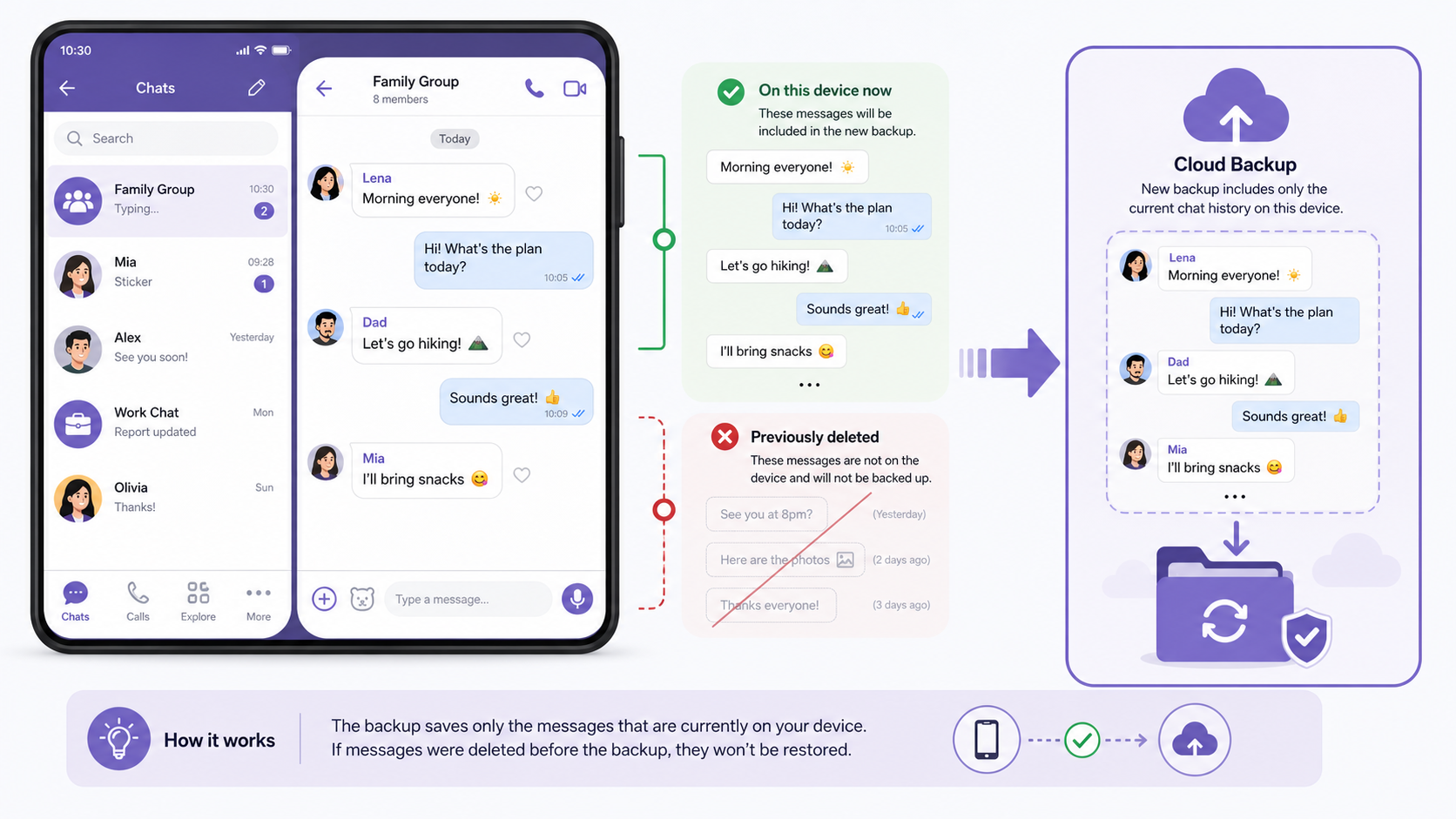
- If no backup appears, create one now for future protection, but remember it will not restore chats deleted before the backup was made.
A new backup does not recover old deleted messages. It only saves the chat history currently available on the device.
Important Limits of Viber Restore Chat History
Many recovery failures happen because users expect Viber backup to work like a full phone clone. It does not. Keep these limits in mind before you reset your phone or reinstall the app.
- Same phone number is usually required: Viber needs the number linked to the original account and backup.
- Same platform matters: Android backups and iPhone backups are not always interchangeable through the standard restore process.
- Backups may not include all media: Text chat history is the main focus. Photos, videos, and files may need to be recovered separately from device storage or cloud photo services.
- Newer messages may be overwritten or missing: Restoring an older backup can bring back older chats but may not include messages received after that backup date.
- Deleted account recovery is different: Reinstalling Viber is recoverable if a backup exists. Deleting your Viber account can permanently remove associated data.
- Desktop Viber is not a full backup replacement: Desktop message history may show synced conversations, but it should not be treated as a reliable recovery source for a lost phone backup.
Can You Recover Viber Messages Without Backup?
In most cases, no. If the messages were deleted and no backup existed before deletion, there is usually no official way to recover deleted Viber chats. Viber cannot simply resend your private chat history from its servers.
That said, you can still check a few places before giving up:
- Other linked devices: If you used Viber on desktop, some conversation fragments may still be visible there, depending on sync status and deletion timing.
- Phone notifications: Some messages may still appear in notification history on certain Android devices, but this is limited and unreliable.
- Gallery or Photos app: Images and videos may have been auto-saved outside Viber.
- Cloud photo backup: Google Photos, iCloud Photos, or other backup services may still contain received media.
- File manager: On Android, some downloaded files may remain in device folders even after the chat is gone.
Be careful with third-party tools that promise full recovery of deleted Viber messages without backup. Some may only scan cached files, while others may require risky permissions, root access, or payment before showing whether anything is actually recoverable.
How to Recover Viber Photos, Videos, and Files
Media recovery is different from message recovery. Even if deleted Viber chats cannot be restored, photos or videos may still exist if they were saved to your device or backed up by another service.
Places to check for Viber media
- Your phone’s Gallery or Photos app
- Recently Deleted or Trash folder in the photo app
- Google Photos or iCloud Photos
- Downloads or file manager folders
- Cloud storage apps you use for automatic backup
- Desktop Viber folders, if you downloaded files on a computer
If the media was never downloaded or saved, and the chat containing it was deleted without backup, recovery is unlikely.
What to Do Before Reinstalling Viber
Before you uninstall the Viber messenger or reset your phone, take a few minutes to protect anything that still exists. Many users lose recoverable data because they reinstall too quickly.

- Check the latest Viber backup date.
- Save important photos, videos, and documents manually.
- Confirm that you know the phone number linked to the account.
- Make sure you can access the correct Google or Apple account.
- Do not create a new backup if you are trying to preserve an older backup, unless you understand that it may replace the previous one.
How to Prevent Losing Viber Chats Again
The best recovery plan is to make future recovery simple. Once your chats are restored or you finish checking your options, set up a regular backup schedule.
- Enable automatic Viber backups.
- Choose a backup frequency that matches how often you use Viber.
- Keep enough Google Drive or iCloud storage available.
- Save important media outside Viber, especially documents, family photos, and work files.
- Review backup settings before changing phones.
If you rely on Viber for work, communities, or family communication, it is worth checking backup settings once a month. You can also follow updates and practical tips on the Viber Blog.
Conclusion
The safest way to recover Viber messages is to restore a backup made before the chats were deleted. Without that backup, full chat recovery is usually not possible, although photos, videos, and files may still be recoverable from your phone, cloud photo storage, or another linked device. Before reinstalling Viber, always check your backup date, account, phone number, and saved media so you do not accidentally replace the only copy you have.
FAQ
Can I recover deleted Viber chats without backup?
Usually no. Without a backup created before deletion, Viber cannot normally restore deleted private chat history from its servers.
Does Viber backup include photos and videos?
Viber backup mainly focuses on chat history. Media files may not be fully included, so you should check your phone gallery, cloud photo backup, and file storage separately.
Can I restore Viber messages to a new phone?
Yes, if you use the same phone number, the same backup account, and a compatible platform. Moving between Android and iPhone may have major limitations.
Will restoring a Viber backup delete my current chats?
It can replace or miss newer messages depending on the backup date and restore process. Always check the backup date before restoring.
Can Viber support recover my deleted messages?
Viber support generally cannot recover private deleted messages that were not backed up. They may help with account or activation issues, but not with rebuilding unavailable chat history.